| Author |
Message |
lavalarva
2011 SNES Champ
Joined: Dec 04 2006
Posts: 1929

|
There has been quite a few threads about computer problems so I might as well post mine here too.
My laptop shut down today while I was on the internet. At first I thought there was a blackout, then I remembered blackouts don't affect laptops because they can run on their battery.
Now, it doesn't do anything when I try to turn it on. No sound and no light anywhere, not even the one that lights up when the power adaptor is plugged.
As I don't think laptops can run only on the power adaptor and need a functional battery (anyone can confirm?), it's probably because my battery is either :
a) dead
b) empty because my power adaptor broke
I tried testing other power adaptors, but my laptop is old and it isn't compatible with my sister's and my mom's laptop's adaptors.
Also, this laptop heated up VERY quickly, so it could be overheating. I'm not sure what this affects though.
To end this, I have a few questions :
- If my battery is dead, how do I replace it?
- Where should I go to have my laptop checked and not be ripped off?
- Is my data safe? How can I salvage it if my laptop must be replaced?
|
|
|
  |
|
|
Doddsino
Joined: Oct 01 2009
Posts: 5316
|
|
|
|
|
Douche McCallister
Moderator
Title: DOO-SHAY
Joined: Jan 26 2007
Location: Private Areas
Posts: 5672
|
Make and model. You can usually remove the battery from a tab on the bottom of the laptop. If you buy a new battery go to bestbuy or walmart and if it doesn't fix the issue return it. Also trying a replacement AC cord might be a good idea. I know my previous laptop won't charge because my ac adapter had a straight AC connector instead of the bent one. I have a short in the wire and it will only charge if it is bent at a certain angle.
|
|
|
 |
|
|
username
Title: owner of a lonely heart
Joined: Jul 06 2007
Location: phoenix, az usa
Posts: 16137
|
| Douche McCallister wrote: |
| Make and model. You can usually remove the battery from a tab on the bottom of the laptop. If you buy a new battery go to bestbuy or walmart and if it doesn't fix the issue return it. Also trying a replacement AC cord might be a good idea. I know my previous laptop won't charge because my ac adapter had a straight AC connector instead of the bent one. I have a short in the wire and it will only charge if it is bent at a certain angle. |
my blackberry headphones are doing the same thing. they only work 100% if i keep fidgeting w/the wire and bending them all the time. its pretty fucking annoying.
|

| Klimbatize wrote: |
| I'll eat a turkey sandwich while blowing my load |
|
|
   |
|
|
Ermac
Title: Thread Killer
Joined: Aug 04 2008
Location: Outworld
Posts: 1512
|
| lavalarva wrote: |
To end this, I have a few questions :
- If my battery is dead, how do I replace it?
- Where should I go to have my laptop checked and not be ripped off?
- Is my data safe? How can I salvage it if my laptop must be replaced? |
1. Best way is to check the model number of the laptop and then search ebay. Most Batterys are $50-$75
2. IDK, I would get a new battery first, also make sure the charging port is working correctly, some laptops for a few years had problems with the power cord port becomming unsodered from the Mobo, hence not being able to turn on or charge, especially in Toshiba's.
3.U can take out the Hard Drive and then buy a convertor that will allow it to be hooked up to a regular PC so you can make backups
|
|
|
|
|
|
Hacker
Banned
Joined: Sep 13 2008
Posts: 3129
|
Yes laptops can only run on AC power.
Now, I think your laptop is completely ruined. If you still want to get it checked (it could just be a short in the internal power cords) then take it to a local store and NOT a chain (EG Geek squad, Best Buy).
However it is possible to get your data as long as the hard drive still works . If you can get a computer you might be able to connect the hard drive from the laptop in place of the hard drive of the computer. It works pretty much the same way as connecting a secondary hard drive, except your replacing a hard drive.
| Ermac wrote: |
| lavalarva wrote: |
To end this, I have a few questions :
- If my battery is dead, how do I replace it?
- Where should I go to have my laptop checked and not be ripped off?
- Is my data safe? How can I salvage it if my laptop must be replaced? |
1. Best way is to check the model number of the laptop and then search ebay. Most Batterys are $50-$75
2. IDK, I would get a new battery first, also make sure the charging port is working correctly, some laptops for a few years had problems with the power cord port becomming unsodered from the Mobo, hence not being able to turn on or charge, especially in Toshiba's.
3.U can take out the Hard Drive and then buy a convertor that will allow it to be hooked up to a regular PC so you can make backups |
only listen to #1
Ermac has no clue what he's talking about for part #2 and #3
Cables that connect hard drives are 34 pin ribbon cables which is an industrial standard.
So unless your laptop was made by...NASA or has a different number of pins dont worry about it
|
|
|
|
|
|
Ermac
Title: Thread Killer
Joined: Aug 04 2008
Location: Outworld
Posts: 1512
|
|
|
|
|
Hacker
Banned
Joined: Sep 13 2008
Posts: 3129
|
Great.
That cable takes a hard drive with a lower pin count and makes it a 34 pin connector.
So again, unless his laptops hard drive has a different pin count he won't need that
Oh and here's a quote from that website
| Quote: |
Simply attach your laptop's 2.5" drive to this adapter and connect the adapter to a USB 2.0 to IDE drive adapter (not included). |
So he would need to buy two different things to connect his hard drive to a desktop. unless it's a lower pin count in which case he will need that if he wants to add the hard drive to his other computer (internally not via USB)
|
|
|
|
|
|
Knyte
2010 SLF Tag Champ*
Title: Curator Of The VGM
Joined: Nov 01 2006
Location: Here I am.
Posts: 6749
|
It depends on the age of the laptop. If it was made in the last 3 years, then it probably has a sata drive, and therefore, no adapters needed.
If it is an IDE drive, then you would need an adapter in order to hook it up to a desktop PC.
How to tell the difference:
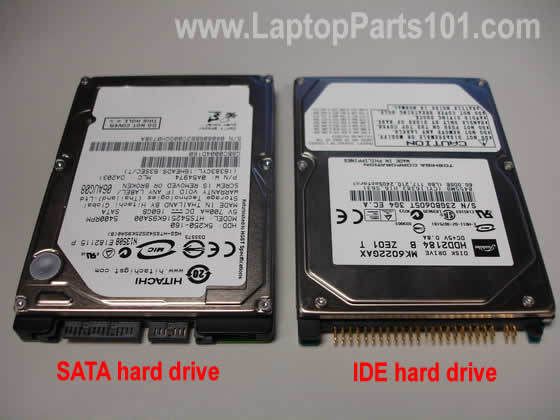
You can get much better all in one adapters if you need one. Let us know.
|
|
|
 |
|
|
Alowishus
Joined: Aug 04 2009
Posts: 2515
|
Do you use your laptop with the power cable plugged in all the time?
If your answer to that is yes then your battery is dead. Using the power cable to charge the computer constantly ruins it.
|
|
|
|
|
|
lavalarva
2011 SNES Champ
Joined: Dec 04 2006
Posts: 1929
|
| Alowishus wrote: |
Do you use your laptop with the power cable plugged in all the time?
If your answer to that is yes then your battery is dead. Using the power cable to charge the computer constantly ruins it. |
I looked into it a bit, and people either said this, or that it didn't change anything because the battery stops charging when it's full.
It's not the battery anyway. If it was, I'd just have to take it out and run it only with the power cord. It'd be very vulnerable to power surges though.
I left my laptop in a local PC shop for them to find the problem. There IS something broken, or at the very least some crap that went loose inside.
The guy will call me in 2-3 days and tell me what's wrong, and how much it would cost to repair.
It's most likely the power supply that's fried, but it could also be the motherboard.
If it's the motherboard, I might get a new laptop if it costs too much.
They sell something you can connect your hard drive to so it can connect to the USB drives, so you can use it like a giant USB key.
What I wanted the most was to keep the data. As long as the hard drive didn't break too, I'll be OK.
|
|
|
|
|
|
Alowishus
Joined: Aug 04 2009
Posts: 2515
|
| lavalarva wrote: |
| Alowishus wrote: |
Do you use your laptop with the power cable plugged in all the time?
If your answer to that is yes then your battery is dead. Using the power cable to charge the computer constantly ruins it. |
I looked into it a bit, and people either said this, or that it didn't change anything because the battery stops charging when it's full.
It's not the battery anyway. If it was, I'd just have to take it out and run it only with the power cord. It'd be very vulnerable to power surges though.
I left my laptop in a local PC shop for them to find the problem. There IS something broken, or at the very least some crap that went loose inside.
The guy will call me in 2-3 days and tell me what's wrong, and how much it would cost to repair.
It's most likely the power supply that's fried, but it could also be the motherboard.
If it's the motherboard, I might get a new laptop if it costs too much.
They sell something you can connect your hard drive to so it can connect to the USB drives, so you can use it like a giant USB key.
What I wanted the most was to keep the data. As long as the hard drive didn't break too, I'll be OK. |
Yeah it's possible to get data extracted from your computer anyway. Hope you get it sorted.
|
|
|
|
|
|
lavalarva
2011 SNES Champ
Joined: Dec 04 2006
Posts: 1929
|
I'm buying a new laptop. There's something broken inside the old one that could cost 150$ to repair. It's not valuable enough to be worth it.
I'll buy a cheap laptop (the cheapest ones are still better than my old one anyway), and transfer my files on it.
My hard drive is still good, so after I'm done transferring my files we'll use it to backup system drivers and some other stuff from our computers.
|
|
|
|
|
|
GPFontaine
Joined: Dec 06 2007
Location: Connecticut
Posts: 11244
|
| lavalarva wrote: |
They sell something you can connect your hard drive to so it can connect to the USB drives, so you can use it like a giant USB key.
What I wanted the most was to keep the data. As long as the hard drive didn't break too, I'll be OK. |
Remember, your hard drive has a physical read head and disk in it, therefore it is NOT a USB flash card and you can't just unplug it. You must safely remove it or risk data loss. Just eject the sucker using Window's device control and you'll be all set.
| lavalarva wrote: |
I'm buying a new laptop. There's something broken inside the old one that could cost 150$ to repair. It's not valuable enough to be worth it.
I'll buy a cheap laptop (the cheapest ones are still better than my old one anyway), and transfer my files on it.
My hard drive is still good, so after I'm done transferring my files we'll use it to backup system drivers and some other stuff from our computers. |
Sounds like a solid plan.
|
|
|
|
|
|
lavalarva
2011 SNES Champ
Joined: Dec 04 2006
Posts: 1929
|
I know Sony laptops have higher quality than Gateway laptops. But is it worth the extra 200$?
I bought the Gateway one, but now I'm wondering if the Sony one would last much longer.
|
|
|
|
|
|
Ermac
Title: Thread Killer
Joined: Aug 04 2008
Location: Outworld
Posts: 1512
|
the new sony vaios have spaced keys similiar to the macbook pro which I like
|
|
|
|
|
|
GPFontaine
Joined: Dec 06 2007
Location: Connecticut
Posts: 11244
|
Sony makes shitty laptops. They are generally trendy, but they are absolute pieces of crap.
Here is my feeling about laptop brands. I am basing my statement on Warranty, Service, Usability, Features, Speed, and Appearance.
Top Brands:
Dell, Acer, Asus, Apple
Average Brands:
Toshiba, Fujitsu, Gateway
Shitty Brands:
Sony, HP/Compaq
|
|
|
|
|
|
username
Title: owner of a lonely heart
Joined: Jul 06 2007
Location: phoenix, az usa
Posts: 16137
|
| GPFontaine wrote: |
| Here is my feeling about laptop brands. I am basing my statement on Warranty, Service, Usability, Features, Speed, and Appearance. |
how much does each category weigh on your scale?
in other words, out of those 6 categories, which one is most important to least important? i understand they all play an important part, but you know what i mean.
|
| Klimbatize wrote: |
| I'll eat a turkey sandwich while blowing my load |
|
|
|
|
|
lavalarva
2011 SNES Champ
Joined: Dec 04 2006
Posts: 1929
|
Guess I made the right choice then 
Here's a comparison of the two laptops I considered buying :
- Hard drive -
Gateway : 640 Gb
Sony : 500 Gb
- Memory -
Gateway : 4 Gb RAM
Sony : I don't remember. 4 Gb at best, as I know it wasn't better than the Gateway one.
- Graphic Card -
Gateway : 1 Gb (serious overkill, I don't think I own anything requiring more than a 128 Mb graphic card  )
Sony : 512 Mb
- Price -
Gateway : 749$
Sony : 799$
The guy selling the laptops had ranked the laptop brands like this :
High quality : Toshiba, HP, Sony, Samsung
Medium quality : Dell
Low quality : Acer, Gateway, another one I forgot about.
|
|
|
|
|
|
GPFontaine
Joined: Dec 06 2007
Location: Connecticut
Posts: 11244
|
| username wrote: |
| GPFontaine wrote: |
| Here is my feeling about laptop brands. I am basing my statement on Warranty, Service, Usability, Features, Speed, and Appearance. |
how much does each category weigh on your scale?
in other words, out of those 6 categories, which one is most important to least important? i understand they all play an important part, but you know what i mean. |
I never really put it to a numerical scale, I just weigh it in my head. If I had to put numbers to it, maybe this would be it:
Warranty: 10%
Service: 5%
Usability: 25%
Features: 25%
Speed: 20%
Appearance: 15%
Usability and Features are the most important by far. This is actually why Apple scores so well with me. They really focus on things like quality keyboard layouts, bright screens, full sets of ports, quiet DVD drives, and compact size. The only reason I don't rave about Apple computers all the time is because their price is way too high. I mean, WAY too high. Like, they must be high to make their prices that high.
I don't include prices when I am shopping though because I go with a budget and only look at machines that fit inside it. So price isn't considered, just capability within the budget.
|
|
|
|
|
|
|
|