| Author |
Message |
Syd Lexia
Site Admin
Title: Pop Culture Junkie
Joined: Jul 30 2005
Location: Wakefield, MA
Posts: 24887

|
When ever I start up my computer and explorer.exe load, I get the following error.
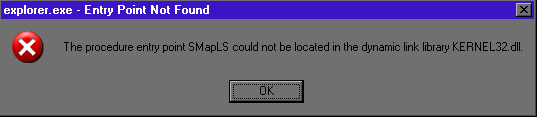
Until I click okay, Windows XP won't fully load. This has been going on for months and I have ignored it.
On top of that Windows Automatic Updates is broken. Under control panel, it is listed as "Download updates but let me choose when to install them", but Windows Security Center says that Automatic Updates isn't running and it doesn't show up under services.msc. When I try and run the web version of Windows Updates from the Start Menu, it starts up and lets me choose Express or Custom, but then it encounters and error, and the applet offers no indication as to what the encountered error was.
I have run Hijack This, AVG Free Edition, Registry Mechanic, Spybot SD, and Malwarebyte's Anti-Malware with no luck. Any ideas?
|
|
|
     |
|
|
GPFontaine
Joined: Dec 06 2007
Location: Connecticut
Posts: 11244
|
http://sydlexia.com/forums/viewtopic.php?t=9065
No new news from me. Personally I think that given the number of issues you have, I would consider doing an overlay install or a full reinstall of Windows. Or just wait for Windows 7 to come out and upgrade to that.
|
|
|
|
|
|
Syd Lexia
Site Admin
Title: Pop Culture Junkie
Joined: Jul 30 2005
Location: Wakefield, MA
Posts: 24887
|
I don't think I have an XP disc. It came loaded on my computer, but for some reason, I don't think they actually have me the disc.
|
|
|
|
|
|
Miguelius
Title: 83956789546
Joined: Apr 16 2009
Location: Chaco, Argentina
Posts: 420
|
Download an unnatended version, reinstall it and forget about it....
That's what I did when in the same dilema.
I know some may disagree, but I don't feel like tormenting myself with moral dilemas.......

|
|
|
 |
|
|
Douche McCallister
Moderator
Title: DOO-SHAY
Joined: Jan 26 2007
Location: Private Areas
Posts: 5672
|
|
|
|
|
Syd Lexia
Site Admin
Title: Pop Culture Junkie
Joined: Jul 30 2005
Location: Wakefield, MA
Posts: 24887
|
Didn't find anything. Maybe I should go to FinallyFast.com...
|
|
|
|
|
|
GPFontaine
Joined: Dec 06 2007
Location: Connecticut
Posts: 11244
|
| Syd Lexia wrote: |
| Didn't find anything. Maybe I should go to FinallyFast.com... |
Did your computer come with any disks for repair?
|
|
|
|
|
|
Syd Lexia
Site Admin
Title: Pop Culture Junkie
Joined: Jul 30 2005
Location: Wakefield, MA
Posts: 24887
|
Came with no discs at all.
|
|
|
|
|
|
GPFontaine
Joined: Dec 06 2007
Location: Connecticut
Posts: 11244
|
Syd, do you feel like a WWI soldier from Russia?
|
|
|
|
|
|
Syd Lexia
Site Admin
Title: Pop Culture Junkie
Joined: Jul 30 2005
Location: Wakefield, MA
Posts: 24887
|
Or a Soviet soldier from WWII. I have bullets and no gun, and the guy next to me has bullets but no gun. And neither of us has shoes.
|
|
|
|
|
|
Ermac
Title: Thread Killer
Joined: Aug 04 2008
Location: Outworld
Posts: 1512
|
Syd,
I have a special XP disk that installs everything (cd key, activation,drivers)
If you need it, let me know
|
|
|
|
|
|
Knyte
2010 SLF Tag Champ*
Title: Curator Of The VGM
Joined: Nov 01 2006
Location: Here I am.
Posts: 6749
|
You could try to overwrite your existing KERNEL32.dll with a vanilla copy.
http://www.dll-files.com/dllindex/pop.php?kernel32
Download this. Find your original (C:\Windows\system32\), make a backup of it. (Or just temp rename it to something like "KERNEL32X", then copy the new one in, overwriting the old one. Reboot. If it fixes it, great. If not, no harm done.
|
|
|
|
|
|
Syd Lexia
Site Admin
Title: Pop Culture Junkie
Joined: Jul 30 2005
Location: Wakefield, MA
Posts: 24887
|
The system just rewrites the blank kernel with the current one.
|
|
|
|
|
|
GPFontaine
Joined: Dec 06 2007
Location: Connecticut
Posts: 11244
|
Syd,
If you can borrow a Windows XP CD it would be very helpful.
I would direct you to try running System File Checker.
http://support.microsoft.com/kb/310747
You would want to use the /scannow option. Do NOT try this without a Windows XP CD.
|
|
|
|
|
|
|
|